Toll Free: 866.905.6744 | Local: 845.652.5250

How to Choose a 3.5-inch TFT LCD Module?

Choosing a 3.5-inch TFT LCD module is not simply a matter of selecting the brightest screen. The right decision depends on viewing distance, enclosure size, operating temperature, touch requirements, and available power. A compact display may look impressive on a specification sheet, yet perform poorly under sunlight or inside a crowded control panel. Real projects expose those gaps quickly.

Display-industry analyst Bob Raikes captures the central issue clearly: “The display is the user interface.” That principle matters when comparing a 3.5-inch TFT LCD Module for medical instruments, industrial meters, handheld devices, or embedded control systems. Users interact with contrast, response speed, viewing angle, and touch accuracy before they notice processor specifications. A screen that responds slowly can make a reliable product feel defective.

Practical evaluation should begin with the interface, not marketing language. Check the native resolution, active area, connector type, controller compatibility, and interface standard. SPI may simplify wiring, while RGB or parallel interfaces can support faster image updates. Confirm whether the backlight remains readable at the intended brightness level. Measure the actual frame and mounting holes, because small dimensional errors can stop installation. I have seen designs fail here.

Do not overlook supply voltage, current consumption, storage temperature, and long-term availability. Datasheets can be incomplete. Samples should be tested with the final enclosure, cable length, software, and touch panel. That extra step feels slow, but it often prevents expensive redesigns. No module is perfect. The best choice balances visibility, integration effort, reliability, and cost for the product’s real operating conditions.

How to Choose a 3.5-inch TFT LCD Module?

Define Your Display Requirements and Application Conditions

Choosing a 3.5-inch TFT LCD module starts with the display environment, not the screen size. Write down what users must see, touch, and read. For a handheld meter, small numerals may need strong contrast and a wide viewing angle. For a control panel, touch accuracy and glove operation can matter more. Define the viewing distance, mounting direction, and expected daily operating hours. Good requirements are measurable.

Check brightness under actual lighting, including sunlight through a window and dim factory areas. A laboratory value may not match a dusty workshop. Select the interface after reviewing the processor, cable length, and update speed. RGB, SPI, and parallel connections each impose different limits on bandwidth and wiring. Confirm logic voltage, current draw, connector position, and mechanical depth before ordering samples. One missed millimeter can delay an enclosure.

Test samples with the intended enclosure, protective cover, and operating gloves. Observe colors from the side, response during rapid screen changes, and startup behavior. I have seen readable displays fail because the backlight overheated inside a sealed case. Thermal conditions deserve a real test, not a guess. Also inspect available documentation, lifetime data, and quality inspection records. These details support traceability when a field unit behaves differently. Do not rely on a single perfect sample. Production variation exists, and early assumptions sometimes need revision.

Compare Screen Size, Resolution, Brightness, and Viewing Angles

When choosing a 3.5-inch TFT LCD module, start with the physical viewing area. The screen should fit the enclosure without crowding buttons or connectors. Measure the visible panel, not only the advertised diagonal size. A few millimeters can affect installation.

Resolution controls how clearly text, icons, and diagrams appear. A 320×480 display can show fine labels, but small fonts may still look cramped. Higher resolution usually improves detail, though it can increase processing demands. Check the interface speed and graphics memory before deciding.

I once selected a sharper panel for a compact controller, but the text became uncomfortable at normal distance. The specification looked excellent. The user experience was not.

Brightness matters under real lighting. Indoor equipment may work well around 300 to 500 cd/m², while outdoor use often needs much more. Test the display beside a window, not only in a dark workshop. A glossy cover can create reflections, even when brightness seems sufficient. Viewing angles also deserve hands-on testing. Move the module vertically and horizontally while watching skin tones, dark areas, and small text. Some panels retain color from the front but lose contrast from above. Others appear acceptable at an angle but wash out under bright light. Check the datasheet, then verify it with a simple prototype. Specifications can be incomplete, and my own quick tests have occasionally been too optimistic.

Select the Appropriate Interface and Controller Compatibility

How to Choose a 3.5-inch TFT LCD Module?

Choosing a 3.5-inch TFT LCD module starts with the interface, not the screen size. The interface determines wiring, speed, and processor workload. SPI uses fewer pins and suits compact control boards. However, its refresh rate may feel limited during fast scrolling or animation. Parallel RGB provides smoother updates but requires more pins and careful timing configuration. MIPI offers high bandwidth, yet it demands a compatible processor and more advanced layout skills.

Controller compatibility needs careful verification. Check the controller model, resolution, color depth, voltage levels, and initialization commands. A matching connector does not guarantee operation. The timing values must also fit the processor’s display driver. I once treated similar pin labels as interchangeable. The backlight worked, but the image stayed blank. The problem was an incorrect reset sequence and mismatched pixel format. That mistake changed how I review datasheets.

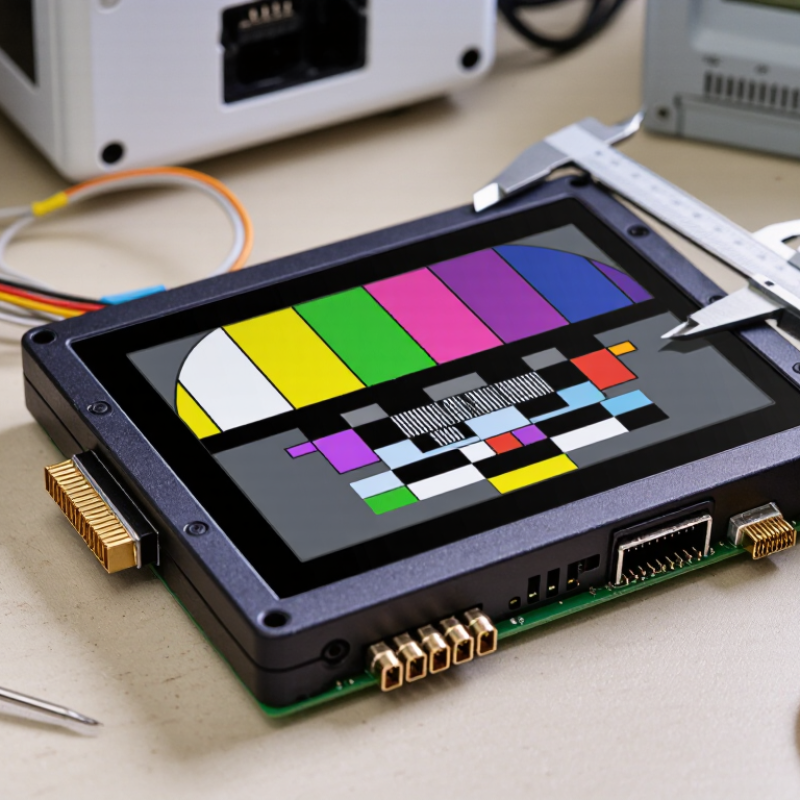
Tips: Confirm the full pinout before ordering. Compare logic voltage with the host board. Test the controller with a simple color-bar program. Leave room for reset and backlight control. If using SPI, measure actual frame rates under realistic graphics loads. Also check whether touch input uses a separate interface. Documentation can be incomplete, so record every tested setting. Some modules need small timing adjustments. This is easy to overlook.

How to Choose a 3.5-inch TFT LCD Module? - Select the Appropriate Interface and Controller Compatibility
Selection Dimension Common Option Typical Technical Characteristics Controller or Host Compatibility Advantages Important Checks Before Selection
Display Resolution 320 × 480 pixels Portrait-oriented resolution commonly used on 3.5-inch panels. The approximate pixel density is 164 pixels per inch. Suitable for controllers supporting the module's declared color format, addressing range, and memory-write commands. Confirm whether the application requires portrait or landscape orientation and verify the active-area dimensions.
Display Resolution 480 × 320 pixels Landscape-oriented version of the same pixel count, also providing approximately 164 pixels per inch on a 3.5-inch diagonal display. Works with a host that can address 480 columns and 320 rows through the selected interface. Useful for dashboards, control panels, and interfaces designed primarily for landscape viewing. Check the panel's native scan direction and whether the software can rotate the frame buffer without reducing performance.
Interface Type 4-wire SPI Uses clock, data, chip-select, and data/command signals. A separate reset line and backlight-control line are also common. Compatible with hosts that provide SPI timing and can send the module's initialization and pixel-write commands. Lower practical refresh performance than parallel or dedicated display interfaces, especially for full-screen graphics.
Interface Type 8-bit or 16-bit MCU Parallel Transfers commands and pixel data over a parallel data bus with write, read, chip-select, and command/data control signals. Requires a host with suitable general-purpose I/O or a memory-mapped display controller. Count the required pins, verify bus voltage levels, and confirm the write-cycle timing supported by the host.
Interface Type RGB Parallel Continuously streams pixel data using separate red, green, and blue signals together with pixel clock, horizontal sync, vertical sync, and data-enable signals. Requires a host with an RGB display peripheral and configurable timing parameters. Uses more pins and requires accurate pixel-clock, front-porch, back-porch, and sync timing.
Interface Type MIPI DSI Uses high-speed differential lanes for display data and normally requires a dedicated display subsystem. Compatible only with hosts that provide the required MIPI DSI lane configuration, video or command mode, and panel initialization support. Reduces parallel wiring and can support high-speed display transfer with suitable hardware. Not a direct replacement for SPI or MCU parallel; verify lane count, signal voltage, timing, and software support.
Color Format RGB565 Uses 16 bits per pixel: 5 bits for red, 6 bits for green, and 5 bits for blue. Requires a controller and software driver that support 16-bit pixel writes or conversion from the application's frame-buffer format. Confirm the controller's pixel-format command and check whether byte order or color order can be configured.
Color Format RGB666 or RGB888 Provides 18-bit or 24-bit color data, allowing more color gradations than RGB565 when the complete signal path supports it. Requires matching controller configuration, host bandwidth, and interface data width. Can improve color smoothness in gradients and image-heavy applications. Increases data transfer and memory requirements; the panel's native color capability should be checked before implementation.
Controller Compatibility Command-Set Match The host driver must support the module's initialization sequence, sleep and wake commands, address-window commands, memory-write command, and display-on sequence. Compatibility depends on the actual controller command set, not only on the connector or interface name. Obtain the controller datasheet or initialization reference and compare every required command and parameter.
Memory Architecture Internal GRAM The display controller includes internal graphics RAM and can retain written pixel data while the host performs other tasks. Works well with SPI or MCU interfaces when the controller supports partial updates and address-window writing. Check the available memory size, maximum address range, and whether partial-screen updates are supported.
Touch Function No Touch / Resistive / Capacitive Touch functionality may be absent or provided by a separate resistive or capacitive touch controller. Touch communication may use additional analog signals, I²C, SPI, or another dedicated interface. Allows the display to be matched to the interaction method and enclosure requirements. Do not assume that the LCD interface also handles touch; verify touch-controller interface, driver support, and connector pinout.
Electrical Level Logic Voltage and Power Logic supply, I/O voltage, analog supply, and LED backlight supply may be separate or combined depending on the module design. The host must meet the specified logic-high, logic-low, power-sequencing, and current requirements. Correct voltage matching improves reliability and prevents interface damage. Never select a module from connector similarity alone; verify voltage levels, backlight current, and regulator requirements.
Backlight Control Direct Supply or PWM The LED backlight may be controlled by a constant supply, an enable signal, or pulse-width modulation for brightness adjustment. Requires a suitable current-limited supply and, when used, a host PWM output or external backlight driver. Enables brightness control and can help reduce power consumption. Check LED forward-current limits, polarity, dimming frequency, and whether the backlight circuit is included on the module.
Mechanical Integration Active Area, FPC, and Mounting A 3.5-inch diagonal does not define the complete module size. Bezel, PCB, flexible cable, mounting holes, and connector position vary. Mechanical compatibility is independent of controller compatibility and must be checked separately. Prevents enclosure conflicts and reduces redesign risk. Compare outline dimensions, active area, viewing direction, connector orientation, mounting-hole spacing, and cable-bend limits.
Software Driver Initialization and Orientation The driver normally configures power, frame rate, pixel format, display orientation, address order, and sleep or wake behavior. Requires software support for the selected host platform and the exact display controller configuration. Confirm reset timing, initialization delays, color order, coordinate offsets, and rotation behavior before finalizing the design.

Evaluate Touch Functions, Mounting Options, and Power Needs

Choosing a 3.5-inch TFT LCD module requires more than checking resolution. Touch behavior, mounting space, and power limits often decide whether a prototype survives field testing. Fortune Business Insights valued the global touchscreen display market at about USD 68.95 billion in 2023. It projects a CAGR of 8.4% through 2030. That growth reflects stronger demand for compact human-machine interfaces.

Capacitive touch suits clean indoor panels and supports light finger gestures. Resistive touch can work better with gloves, styluses, or dusty work areas. Test both with the actual enclosure.

A narrow bezel may look attractive, but it can leave insufficient room for a touch controller or flex cable. I have seen otherwise functional samples fail because the cable bent sharply during assembly.

Small detail. Expensive rework.

Mounting holes should match the housing before ordering samples. Check screw clearance, panel thickness, viewing angle, and connector direction. Power needs deserve equal attention. Measure normal current, startup current, and brightness settings.

Grand View Research estimates the TFT-LCD display market will grow at roughly 4% annually from 2024 to 2030. More devices will use these panels, but efficiency still depends on backlight design and firmware control. A module drawing 300 mA may be acceptable on a wall adapter, yet unsuitable for a small battery.

Leave headroom. Field conditions are rarely ideal.

Verify Quality, Reliability, Documentation, and Supplier Support

How to Choose a 3.5-inch TFT LCD Module?

Verify Quality, Reliability, Documentation, and Supplier Support

A 3.5-inch TFT LCD module should survive more than a bright showroom demonstration. Check the screen under low light, direct light, and different viewing angles. Look for uneven backlighting, visible dead pixels, flickering, and loose connectors. Ask for operating temperature data and test samples before placing a large order. I once approved a display after checking only its color. That shortcut caused poor readability inside a metal enclosure.

Documentation reveals the supplier’s engineering discipline. Request a complete datasheet, interface timing details, pin definitions, mechanical drawings, and recommended power limits. Confirm whether the specifications apply to production units or only prototypes. Reliable suppliers explain component changes, inspection procedures, and warranty conditions clearly. Their support team should answer technical questions with measurements, not vague promises. Fast replies are useful, but accurate replies matter more.

Tips: Compare two samples from different batches. Photograph connector labels and mounting holes. Test the module after several hours of continuous operation. Ask how replacement units will match the original display. Keep written records of every approved specification. Small details become expensive later.

Do not ignore software support. A clear initialization example can reduce integration time and prevent incorrect voltage settings. Check whether technical files remain available after delivery. Supplier support should continue during installation, not disappear after payment. Still, no document replaces hands-on testing. Your enclosure, cable length, and controller may expose problems that laboratory samples hide.

How to Choose a 3.5-inch TFT LCD Module?

Use this evidence-based checklist to compare a 3.5-inch TFT LCD module before purchase. Verify measurable product quality, reliability test evidence, complete documentation, and the supplier’s ability to provide technical support.

The chart counts practical verification items: display performance and construction checks for quality; temperature, humidity, vibration, and operating-life evidence for reliability; technical specifications, drawings, and test records for documentation; and sample, customization, warranty, and response-process checks for supplier support. The values represent checklist items, not a ranking of any company or brand.